Your Antigravity quota, in view.
Dockspace shows how much of your Antigravity quota you used, and when it resets, in a bar of widgets beside the macOS Dock. It sits next to your Claude and Codex limits. There is no login: Dockspace asks the Antigravity app on your Mac.


What the widget shows
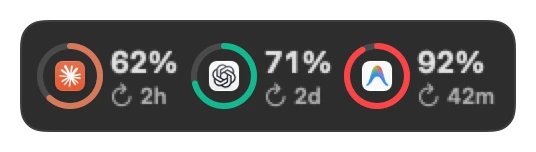
AI Limits puts Antigravity, Claude and Codex in one tile. Each app has a ring that shows the share used, and the time until its limit resets. The ring changes colour as the limit gets close.
Antigravity reports its quota in two windows: 5 hours and a week. The usage panel lists both, with the reset time of each.
Rest the pointer on the Antigravity column, or click it, to open the agent detail dashboard: the 5-hour and weekly bars with a pace mark, step and session counts for Today, 7 Days, 30 Days or 13 Weeks, and a 13-week activity grid.
Where the numbers come from
Antigravity writes no quota file. So Dockspace asks the Antigravity app itself, over a connection that stays on your Mac. The numbers are the ones Antigravity reports to you.
It does not read your prompts or your code, it needs no Google login, and nothing about your quota leaves your Mac. The privacy page lists the few requests the app makes.
Antigravity must be open
The quota comes from the running Antigravity app. If you quit Antigravity, the tile has no new number to show until you open it again.
Claude and Codex do not need their apps open. Dockspace reads their limits from the data they already write on your Mac. See the Claude Code limits, how 5-hour and weekly resets work, the Codex limits and our ccusage alternative.
Every Antigravity session, not only the quota
The AI Agents widget lists your live Antigravity sessions with Claude Code, Codex and Cursor: which one works, which one is done and which one went quiet, for every project.
When an agent finishes, Buddy peeks out of the bar and says which one. You see it even if you look at another app.
Why a bar, not an add-on
A quota that you must open a panel to read is a quota that you forget to read — and on MacBooks, menu bar icons hide behind the camera notch. The Dockspace bar stays readable all day, in the Dock’s place or beside it. See how it replaces the Dock, or the other widgets.
What it costs
Dockspace is free to start, with ten widgets that stay free. AI Limits and the agents board are part of Dockspace Pro: One Year at $11.99 a year, Lifetime from $19.99 once, or the Forever Edition at $49.99. You can get a refund within 14 days, for any reason.
It needs macOS 14 Sonoma or later, on Apple silicon or Intel. See the questions for the rest.
Common questions
- How does Dockspace read my Antigravity quota without a Google login?
- While the Antigravity app is open on your Mac, Dockspace queries its local process directly for the 5-hour and weekly quota numbers Antigravity reports to you. No Google sign-in, API key, prompts or code ever pass through Dockspace.
- What windows does the Antigravity quota monitor track?
- Antigravity reports two rolling windows: a 5-hour window and a 7-day weekly window. Dockspace shows the percentage used and exact reset countdown for both, plus a 13-week hover dashboard with pace marks, step counts and session counts.
- Why does Antigravity need to stay open while Claude Code and Codex do not?
- Antigravity does not write its quota percentages to a file on disk, so Dockspace asks the running app on your Mac. Claude Code and Codex write usage data locally on disk, so their tiles stay updated even after you close your terminal.
- Is the Antigravity quota widget free or Pro?
- Dockspace starts free forever with Replace the Dock and 10 core widgets. AI Limits (Antigravity, Claude and Codex) and the AI Agents board are part of Pro, from $11.99/year or $19.99 once with a 14-day refund.
Free to start. Yours to keep.
macOS 14 Sonoma or later · Apple silicon and Intel. Download the disk image and try ten widgets free forever, or unlock all 174 with Pro.